 Disjoncto


Get started
Get started
Disjoncto opens in the browser, installs like an application and works without Internet once loaded.
Open the application#
Open app.disjoncto.com in a recent Safari, Chrome, Edge or Firefox. No account is required: you land directly on the home screen.
 Light
 Dark
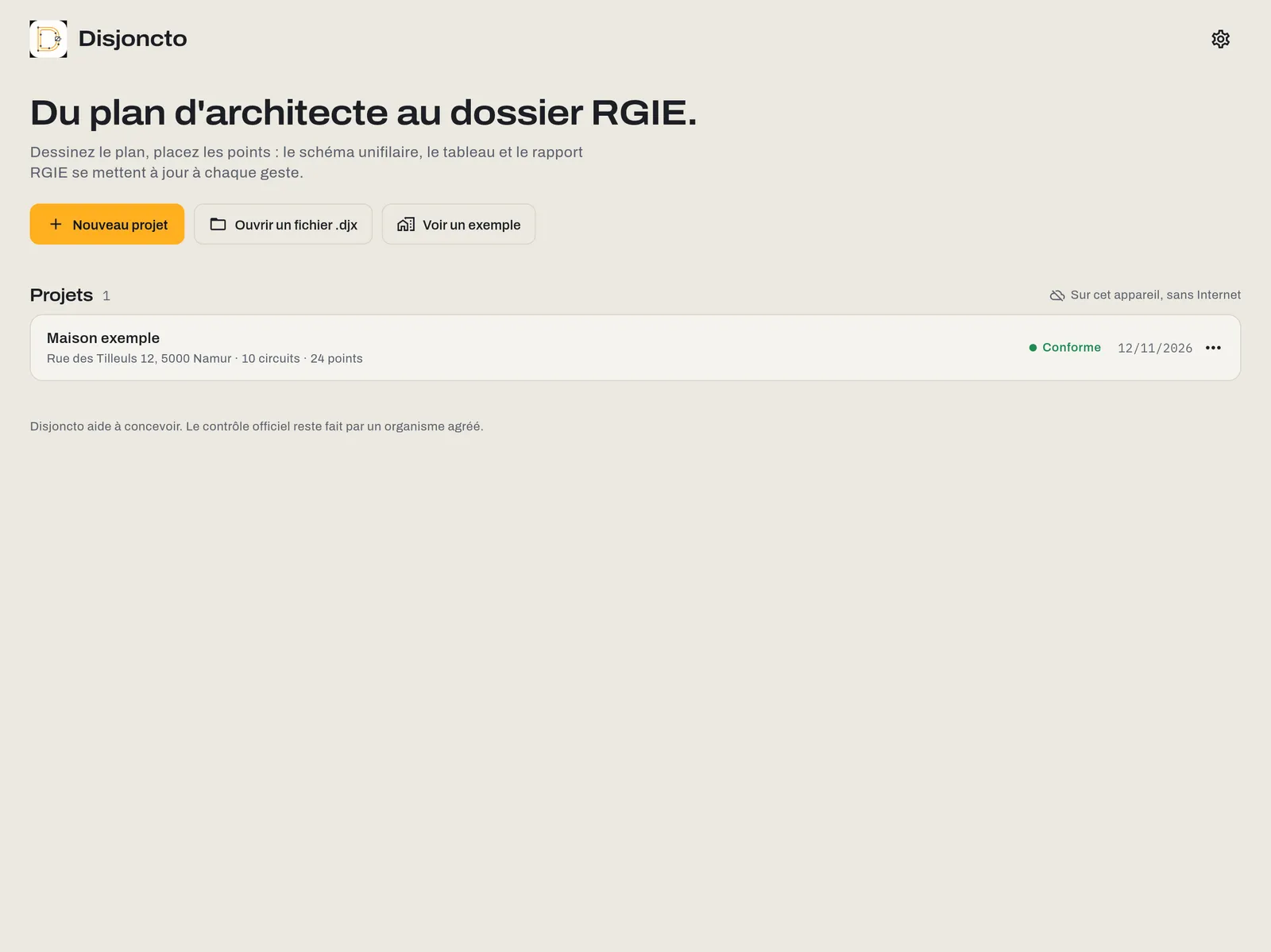
The home screen offers three actions:
- New project: name, address, client and network (single-phase 2 × 230 V, three-phase 3 × 230 V or three-phase 3N × 400 V). The project starts with a “Ground floor” level and a “Main board”.
- Open a .djx file: imports a project you saved or received from a colleague (see Files and offline).
- View an example: loads the example house.
Each project in the list shows its address, its number of circuits and points, its status (Compliant, To check, Non-compliant) and its date. The ⋯ menu on a row lets you move it to the trash.
Install on the home screen#
The web app installs like an application, with its own icon and in full screen:
- iPad and iPhone (Safari): Share button, then “Add to Home Screen”.
- Mac: in Safari, File menu, “Add to Dock”; in Chrome or Edge, the install icon in the address bar.
- Windows, Android (Chrome, Edge): browser menu, “Install app”.
The App Store apps for iPad, iPhone and Mac arrive when the stores go live coming soon. Projects move between versions as .djx files.
Offline#
On first load, the app stores all its files on the device. From then on it opens and works entirely without a connection: drawing, circuits, RGIE check, PDF generation and export. Projects are saved on the device after every change; the top bar shows “Saved on this device”.
When you are online, the app loads the latest version at the next start. Only the cloud, the assistant and payment will need a connection, and they are coming soon.
The example project#
“Example house”, Rue des Tilleuls 12, Namur: a 10 × 8 m ground floor with living room, kitchen, bathroom, hall and laundry room; a 63 A single-phase supply; an 18 Ω earth and documented equipotential bonding; a main board with a 300 mA main RCD, a 30 mA RCD and ten circuits (lighting, sockets, hob, oven, dishwasher, washing machine, tumble dryer, water heater, bathroom and laundry room). It is compliant: a good place to try every tool, trigger a remark and fix it.
The example project does not count towards the one-project limit of the free version.
The editor at a glance#
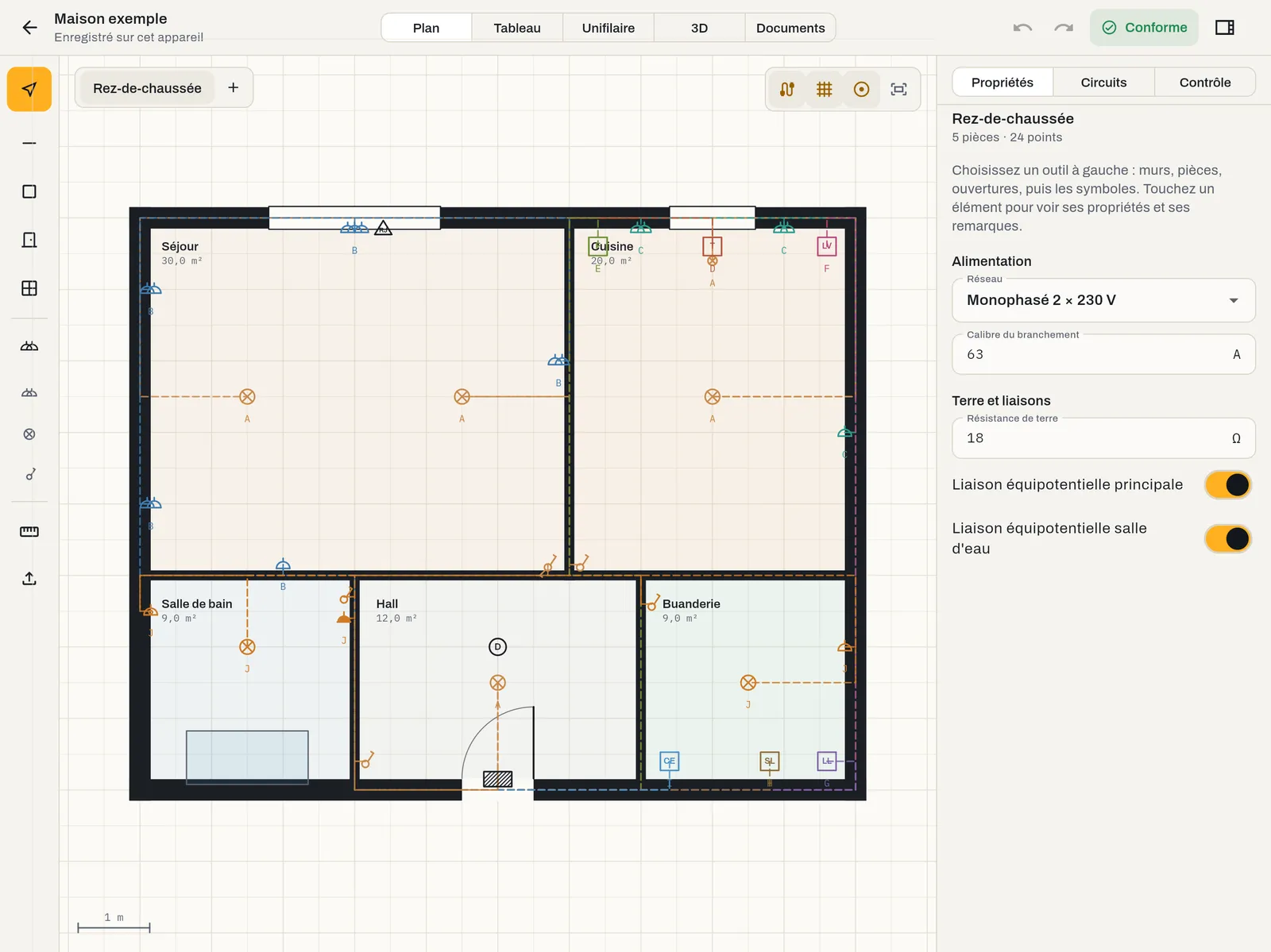
- Top bar: back to home, project name and save state, the Plan, Board, Single-line, 3D and Documents modes, Undo and Redo, the compliance status (tap it to open the Check tab) and the button that shows or hides the right-hand panel.
- Toolbar (Plan mode, on the left): Select, Wall, Room, Door, Window; Symbols and three shortcuts (double socket, ceiling light, single switch); Measure; Import a plan.
- On the plan: the levels at top left; at top right, Cables, Grid, Snap and Fit all.
- Right-hand panel: the Properties, Circuits and Check tabs.
On a narrow screen (iPhone, window under 720 px wide), the modes move to a bar at the bottom and the panel opens with “Details”. See Devices.
Settings and account#
The gear icon on the home screen opens the settings: language, display (density and interface size), Paper, Graphite or System appearance, rule set, plans, About, and access to the account. The account is optional: it is used for licensing, the cloud and support, never for drawing.